
Overview:
In this blog discuss about What is a variable in Python?,Rules for Python variables,Python Assign Values to Multiple Variables,Assign values at Single or Double Quotes,Get the Type ,Casting,Object Reference in Python.
What is a variable in Python?
A Python variable is a reserved memory location to store values (ie.,Variable is containers that store values) . Python is a dynamically typed language. That means it is not necessary to declare the type of a variable when assigning a value to it, because when we assign any value to the variable, that variable is declared automatically. The equal (=) operator is used to assign value to a variable.In other words, a variable in a python program gives data to the computer for processing.
Syntax:
variable_name = value
For example:
major = 'Tom' # In this major is variable(container to store value) and Tom is a valueThe = is the assignment operator. In this syntax, you assign a value to the variable_name.
The value can be anything like a number, a string, etc., that you assign to the variable.
Rules for Python variables:
- A Pythonvariable name must start with a letter or the underscore character.
- A Python variable name cannot start with a number.
- A Python variable name can only contain alpha-numeric characters and underscores (A-z, 0-9, and _ ).
- Variable in Python names are case-sensitive (name, Name, and NAME are three different variables).
- The reserved words(keywords) in Python cannot be used to name the variable in Python.
Assign values at Single or Double Quotes:
String variables can be declared either by using single or double quotes:
For example:
x = "John"
# is the same as
x = 'John'
Python Assign Values to Multiple Variables :
Also, Python allows assigning a single value to several variables simultaneously with “=” operators.
For example:
a = b = c = 10

print(a)
print(b)
print(c)
Output:
10
10
10Assigning different values to multiple variables:
Python allows adding different values in a single line with “,” operators.
For example:
a, b, c = 1, 20.2, "GeeksforGeeks"

print(a)
print(b)
print(c)
Output:
1
20.2
GeeksforGeeksCan we use the same name for different types?
If we use the same name, the variable starts referring to a new value and type.
For example:
a = 10
a = "GeeksforGeeks"

print(a)
Output:
GeeksforGeeksGet the Type:
You can get the data type of a variable with the type() function.
For example:
x = 5
y = "John"
print(type(x))
print(type(y))
Output:
<class 'int'>
<class 'str'> Casting:
If you want to specify the data type of a variable, this can be done with casting.
For example:
Example:
x = str(3)    # x will be '3'
y = int(3)    # y will be 3
z = float(3)  # z will be 3.0
Object Reference in Python:
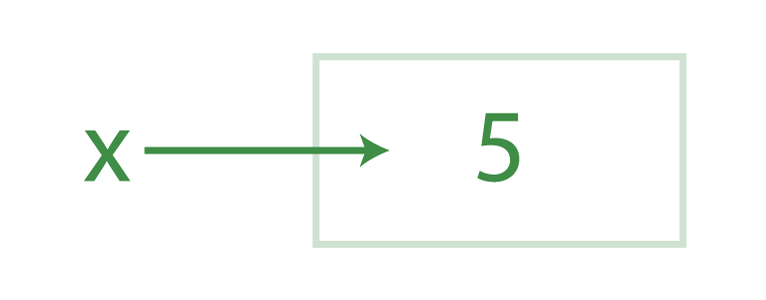
Let us assign a variable x to value 5.
x = 5
Another variable is y to the variable x.
y = x
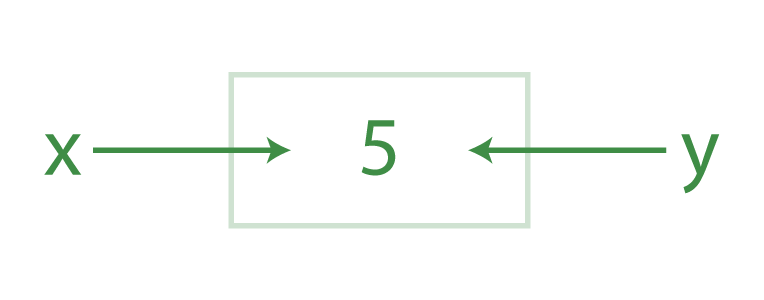
When Python looks at the first statement, what it does is that, first, it creates an object to represent the value 5. Then, it creates the variable x if it doesn’t exist and made it a reference to this new object 5. The second line causes Python to create the variable y, and it is not assigned with x, rather it is made to reference that object that x does. The net effect is that the variables x and y wind up referencing the same object. This situation, with multiple names referencing the same object, is called a Shared Reference in Python.
Reference:
https://www.w3schools.com/python/python_variables.asp
https://towardsdatascience.com/static-typing-in-python-55aa6dfe61b4
https://www.geeksforgeeks.org/python-variables/
https://www.guru99.com/variables-in-python.html
https://www.pythontutorial.net/python-basics/python-variables/


Leave a Reply