What is a Java string?
A Java string is a sequence of characters that exists as an object of the class java.lang. Java strings are created and manipulated through the string class. Once created, a string is immutable — its value cannot be changed.
A string is sequence of characters. A class is a user-defined template for creating an object. A string class is a user-defined template for creating and manipulating string objects, which are sequences of characters.
Immutable String in Java:
- In java, string objects are immutable. Immutable simply means unmodifiable or unchangeable.
- Once a string object is created its data or state can’t be changed but a new string object is created.
How to Create a String Object?
String object can be created using two ways:
- Using String Literal.
- Using new keyword.
Syntax:
<String_Type> <string_variable> = "<sequence_of_string>";
                               (or)
<String_Type> <string_variable> = new <String_Type>("<sequence_of_string>");
Example:
String str = "Good";
       (or)
String s1 = new String("Hello world!");
Types of strings in Java:
- Primitive strings. These are string literals or string calls from a nonconstructor context. A constructor is a special method used to initialize objects. Primitives are not objects and have no methods or properties. They are represented at the lowest level of language implementation.
- Object strings. These are strings created using the new operator. Object strings create two objects, whereas primitives create just one. Object strings create the string literal and the variable to refer to it.
Stack Vs Heap Java:
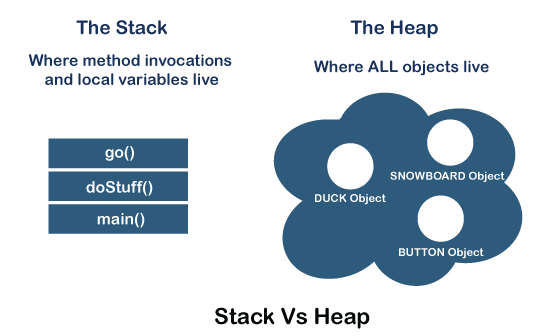
In Java, memory management is a vital process. It is managed by Java automatically. The JVM divides the memory into two parts: stack memory and heap memory. From the perspective of Java, both are important memory areas but both are used for different purposes. The major difference between Stack memory and heap memory is that the stack is used to store the order of method execution and local variables while the heap memory stores the objects and it uses dynamic memory allocation and deallocation. In this section, we will discuss the differences between stack and heap in detail.
String Constant Pool:
It is a pool or storage area in Java heap memory that is dedicated for storing string literals in Java. Whenever we create a string, JVM (Java Virtual Machine) looks into the “string constant pool” to see if the same value is already present there or not.
If it is present, then the address (or reference) of existing string object is stored in the reference variable and if it is not present there, a new String object is created and stored inside the string pool. Then the reference of this newly-created string object is returned.
String str1 = "Scaler";

// New String is not created.
// str2 is pointing to the old string value only.
String str2 = "Scaler";
By New Keyword:
We can also create a string by using the new keyword in Java. As the new keyword works for creating an instance of any other class, in the same way, it works for creating an instance of the String class.
The main difference between creating a string using string literals and the new keyword is that whenever the string is created with the new keyword a new object of String is created in the heap memory outside the string constant pool.
All string objects created using the new keyword are allocated space in the heap memory (outside the string constant pool) irrespective of whether the same valued strings are already present in the heap memory or not.
Syntax:
String stringName = new String("string_value");
Example:
String str = new String("Scaler");Methods of Java Strings:
String Length:
A String in Java is actually an object, which contain methods that can perform certain operations on strings. For example, the length of a string can be found with the length() method:
String str1 = "Java is fun";

// returns the length of str1
    int length = str1.length();
System.out.println(str1.length());
char charAt(int index) Method:
The charAt() method of string in Java accepts an index number as an argument and returns the character at the given index number.
The indexing is from 0 to length-1, where length is the length of the string. In case the passed index number is not present in the string(if it’s equal to or greater than the length of the string or if it is a negative number), StringIndexOutOfBoundsException is thrown.
Syntax:
stringName.charAt(index)
Example :
String str = "scaler academy";
char ch = str.charAt(7);
System.out.println(ch); // output:a
String concat(String string1) Method:
What if we want to concat(or connect) two strings?
We have a method for that too! The concat() method of string in Java is used for concatenating two strings.
Syntax:
string.concat(anotherString)
Example:
String str1 = "scaler";
str1 = str1.concat(" academy");
System.out.println(str1); // scaler academy
String equals(String anotherString) method:
The equals() method of string in Java is used to verify if both the strings are equal or not. The equals method accepts another string as an argument and then checks for the equality of both the strings. If both the strings are equal, true is returned else false is returned.
Syntax:
string.equals(anotherString)
Example:
String str = "scaler";
String str1 = "SCALER";
String str2 = "scaler";
String str3 = "topics";
System.out.println(str.equals(str1));// false
System.out.println(str.equals(str2));// true
System.out.println(str.equals(str3));// false
String contains(String substring) Method:
The contains() method of string in Java is used to verify if the string contains the specified part of the string or not. It returns true if it contains that part and false otherwise. The main difference between the equals() method and the contains() method is that the equals method checks the whole string for equality while the contains method returns true as soon as it encounters a substring of the given string same as specified in the argument of the contains() method. If no such substring is found, it returns false.
Syntax:
string.contains(string)
Example:
String str = "Follow scaler on Linkedin";

// 1st print statement
System.out.println(str.contains("on Linkedin")); // true

// 2nd print statement
System.out.println(str.contains("Twitter")); // false

// 3rd print statement
System.out.println(str.contains("Follow")); // true

// 4th print statement
System.out.println(str.contains("follow")); // false
String join(CharSequence joiner, String st1, String str2, String str3…):
The join() method of string in Java as the name suggests is used to join a group of strings using the joiner between them. The joiner variable can be any character, string or a sequence of characters.
Syntax:
string.join(joiner, str1, str2, str3,..)
Example:
String strJoin = String.join(" ","Have","a","Nice","day");
System.out.println(strJoin);

String str1Join = String.join("-","Have","a","Nice","day");
System.out.println(str1Join);

String str2Join = String.join("/","19","02","2022");
System.out.println(str2Join);

String str3Join = String.join("::","12","18","55");
System.out.println(str3Join);


Output:
Have a Nice day
Have-a-Nice-day
19/02/2022
12::18::55
int compareTo(String string1, String string2) Method:
The compareTo() method of string in Java compares the given strings in the order of occurrence in the dictionary. The comparison is solely based on the Unicode value of the characters of the strings.
Syntax:
string.compareTo(str1, str2)
Example:
String str1 = "Scaler Academy";
String str2 = "Scaler Academy";
String str3 = "Academy Scaler";

int result1 = str1.compareTo(str2);
System.out.println(result1);  // 0

// comparing str1 with str3
int result2 = str1.compareTo(str3);
System.out.println(result2);  // 18

// comparing str3 with str1
int result3 = str3.compareTo(str1);
System.out.println(result3);  // -18
String toUpperCase() Method:
The toUpperCase() method of string in Java is used to convert the lowercase characters of the string to the uppercase(or capital) characters.
Syntax:
string.toUpperCase()
Example:
String str = "keyboard";
String strUpper = str.toUpperCase();
System.out.println(strUpper); //Output:KEYBOARD
String toLowerCase() Method:
The toLowerCase() method of string in Java is used to convert all the characters of the string to the lowercase(or small) characters.
Syntax:
string.toLowerCase()
Example:
String str = "KEyBOArD";
String strLower = str.toLowerCase();
System.out.println(strLower);//output:keyboard
String trim() Method:
The trim() method of string in Java is used to trim (or remove) the extra white spaces from the specified string from both the ends.
Syntax:
string.trim()
Example:
String str = "       Coding is        ";
System.out.println(str + " awesome");


str = str.trim();
System.out.println(str + " awesome");


output:
       Coding is         awesome
Coding is awesome
String replace(char oldChar, char newChar):
The replace() method of string in Java as the name suggests is used to replace all the specified character of the string with another character.
Syntax:
string.replace(oldChar, newChar)
Example:
String str = "Hi, i will be replaced with a";
str = str.replace('i','a');
System.out.println(str);

Output:

Ha, a wall be replaced wath a
Reference:
https://www.geeksforgeeks.org/strings-in-java/
https://www.w3schools.com/java/java_strings.asp
https://codegym.cc/groups/posts/equals-and-string-comparsions
https://www.scaler.com/topics/java/string-in-java/
https://www.theserverside.com/definition/Java-string
https://www.tutorialspoint.com/java/java_strings.htm
 sankaa
Leave a comment